





Almost every week, the technical team is on duty at our switchboard Bao Son Communications also received at least a few urgent calls for help from business owners: “Please take a quick look, the company is running a Google Ads campaign that costs several million a day, but customers who click on the website are blocked by the browser with a bright red warning screen. Your connection is not private!” When our engineers check, the cause is usually not because the website was taken down by hackers, but just because the previous website maker temporarily installed a copy. SSL security certificate free for 90 days and then forget to renew, or the configuration lacks an intermediate authentication chain (Intermediate CA), causing customers to open the web on iPhone and the browser in the Zalo application is blocked.
- Technical nature: SSL security certificate (now operating on the successor standard TLS 1.2 / TLS 1.3) is a digital certificate that helps encrypt the entire data flow transmitted between the customer's browser and the website server, transferring the protocol from
http://less safehttps://with security authentication symbol. - Three vital impacts on business: Bảo vệ thông tin biểu mẫu/mật khẩu/thanh toán khỏi nguy cơ nghe lén; đáp ứng tiêu chuẩn bắt buộc để chạy quảng cáo Google Ads & xếp hạng SEO; đồng thời kích hoạt giao thức HTTP/2 và HTTP/3 giúp trang web tải nhanh hơn rõ rệt.
- Quy định mới 2026–2029 từ CA/Browser Forum: Lộ trình quốc tế đang rút ngắn dần thời hạn hiệu lực tối đa của mỗi lần cấp chứng thư SSL (từ 398 ngày xuống 200 ngày, 100 ngày và tiến tới 47 ngày), đòi hỏi doanh nghiệp phải có đơn vị kỹ thuật quản lý tái cấp phát tự động (Auto-Reissue) để tránh gián đoạn hoạt động.
What is an SSL Security Certificate and How Does HTTPS Encryption Work?
Chứng chỉ bảo mật SSL (viết tắt của Secure Sockets Layer, hiện được nâng cấp lên chuẩn Transport Layer Security – TLS) là một tệp dữ liệu định danh điện tử cài đặt trên máy chủ web nhằm thiết lập đường truyền mã hóa an toàn giữa trình duyệt của người truy cập và máy chủ chứa website.
Để dễ hình dung dưới góc độ vận hành doanh nghiệp: Khi một website chưa cài đặt SSL (địa chỉ chỉ có chữ http:// và bị trình duyệt Chrome, Safari, Edge gắn nhãn “Không bảo mật / Not Secure”), mọi thông tin khách hàng gõ vào biểu mẫu báo giá, số điện thoại, mật khẩu đăng nhập hay thông tin đơn hàng đều truyền đi trên mạng Internet dưới dạng văn bản thuần (Plain Text). Bất kỳ ai dùng chung mạng Wi-Fi công cộng hoặc can thiệp ở trạm trung chuyển mạng đều có thể đọc trộm hoặc chỉnh sửa thông tin đó.
Ngược lại, ngay khi trang web được trang bị chứng chỉ SSL hợp lệ (chuyển sang giao thức https://), quá trình “bắt tay bảo mật” (TLS Handshake) diễn ra tự động chỉ trong vài phần nghìn giây theo tiêu chuẩn kỹ thuật giao thức TLS 1.3 (RFC 8446) của tổ chức IETF với 3 lớp bảo vệ chặt chẽ:
- Mã hóa dữ liệu đường truyền (Encryption): Biến toàn bộ thông tin khách hàng nhập trên website thành chuỗi ký tự mật mã phức tạp (chuẩn khóa đối xứng 256-bit kết hợp khóa công khai 2048-bit/ECC). Kẻ xấu dù có chặn bắt được gói tin cũng không thể giải mã nội dung bên trong.
- Đảm bảo toàn vẹn dữ liệu (Data Integrity): Kiểm soát chặt chẽ gói tin từ lúc rời trình duyệt của khách cho tới khi vào máy chủ hoặc đổ về hệ thống kết nối khách tiềm năng với CRM trên website, ngăn chặn việc bên thứ ba chèn mã độc hoặc chèn quảng cáo lạ vào trang web.
- Xác thực đúng chủ sở hữu tên miền & pháp nhân (Authentication): Chứng minh với trình duyệt rằng người dùng đang thực sự giao dịch với máy chủ chính thức của công ty bạn chứ không phải một trang web giả mạo (Phishing) đánh cắp thương hiệu.
Classification of Popular SSL Security Certificate Groups for Business Websites
Hiện nay, chứng chỉ bảo mật SSL được phân chia theo hai tiêu chí chính: theo mức độ thẩm định danh tính (gồm DV SSL, OV SSL, EV SSL) và theo phạm vi số lượng tên miền được bảo vệ (gồm Single Domain, Wildcard SSL và Multi-Domain SAN SSL).
Việc hiểu rõ từng phân nhóm giúp chủ doanh nghiệp và bộ phận IT chọn đúng loại chứng thư cần thiết, tránh lãng phí ngân sách vào những gói quá đắt hoặc chọn nhầm gói thiếu tính năng kỹ thuật:
Xác Thực Tên Miền (DV)
DV SSL Certificate (Domain Validation)
Cơ quan cấp phát quốc tế (CA) chỉ xác minh quyền quản trị tên miền qua bản ghi DNS hoặc tệp xác thực trên Hosting. Thời gian cấp siêu tốc từ 5–15 phút, chi phí tiết kiệm, phù hợp cho 85% website giới thiệu công ty, tin tức và trang đích chạy quảng cáo.
Xác Thực Tổ Chức (OV)
OV SSL Certificate (Organization Validation)
Bên cạnh quyền sở hữu tên miền, tổ chức CA thẩm định trực tiếp Giấy phép đăng ký kinh doanh, mã số thuế và trụ sở hoạt động của doanh nghiệp. Tên pháp nhân công ty được hiển thị minh bạch trong thông tin chi tiết của chứng thư số trên trình duyệt.
Xác Thực Mở Rộng (EV)
EV SSL Certificate (Extended Validation)
Cấp độ thẩm định khắt khe theo tiêu chuẩn quốc tế dành cho ngân hàng, công ty chứng khoán, cổng thanh toán, bệnh viện lớn và sàn thương mại điện tử. Gói EV SSL đi kèm hạn mức bảo hiểm rủi ro cao (hạn mức bảo hiểm CA quốc tế tương đương ~25 tỷ – 43 tỷ VNĐ).
Expanding Subdomains
Wildcard SSL & Multi-Domain (SAN) Certificate
Just install 1 certificate Wildcard SSL only (*.tenmien.vn) to protect the main domain and unlimited subdomains (crm.tenmien.vn, erp.tenmien.vn, khuyenmai.tenmien.vn), helps the IT department save management time.
Four Practical Benefits When Installing a Genuine SSL Certificate for Your Website
Installing a genuine SSL security certificate brings 4 direct benefits to businesses: removing the "Not Secure" warning on the browser, meeting SEO ranking signals and Google Ads ad approval conditions, increasing page loading speed thanks to the HTTP/3 protocol, and protecting the reputation of legal entities when transacting online.

Completely remove the psychological barrier "No security" that causes customers to leave the site
Currently, all popular browsers from Google Chrome, Apple Safari on iPhone to Microsoft Edge and Coc Coc display warning labels. “Not Secure” (Not Secure) right in the address bar for websites that do not have SSL. If a customer is preparing to fill in the phone number to order or transfer money and sees this warning line, more than 80% of users will immediately close the tab for fear of revealing personal information.
Meets Google SEO ranking standards and mandatory conditions of Google Ads
According to Google Search Central's official guide to HTTPS, the HTTPS security protocol is one of the signals evaluating page experience (Page Experience) in the search ranking algorithm. Especially, if the business is implementing Google Ads advertising service or Google Shopping collects customer information, Google's moderation system will deny ad delivery (Disapproved: Compromised site / Insecure destination) if the landing page lacks a valid SSL or the certificate is expired.
Enable HTTP/2 and HTTP/3 (QUIC) protocols to help websites load faster
Many people still mistakenly think like 10 years ago that "installing SSL encryption makes the website run slower". The reality in 2026 is exactly the opposite: modern browsers only allow high-speed multi-threaded transport protocols to be enabled. HTTP/2 and HTTP/3 (QUIC) on websites that have HTTPS/TLS installed. When combining a TLS 1.3 standard SSL certificate with High speed NVMe Cloud Hosting service, server response times are significantly shortened, directly improving Core Web Vitals scores.
Required technical conditions to integrate payment gateway, Zalo OA and Webhook CRM
In the modern digital business environment, every online payment gateway (VNPay, VietQR API, MoMo, Stripe), Zalo Mini App, Facebook Conversions API or Webhook data push stream to CRM software requires the data receiving endpoint (Endpoint URL) to use a valid SSL certificate from reputable certification providers.

Bao Son system engineers support infrastructure testing and transfer all Website/Email data safely in 30 minutes without interruption.
Compare Free SSL (Let's Encrypt) and Paid Commercial SSL: When Should You Use Which?
The core differences between free SSL (like Let's Encrypt) and paid commercial SSL (like Sectigo, PositiveSSL, GeoTrust, DigiCert) lie in the validity management cycle, mobile/API chain of authentication compatibility, financial risk insurance package, and direct technical support service when problems arise.
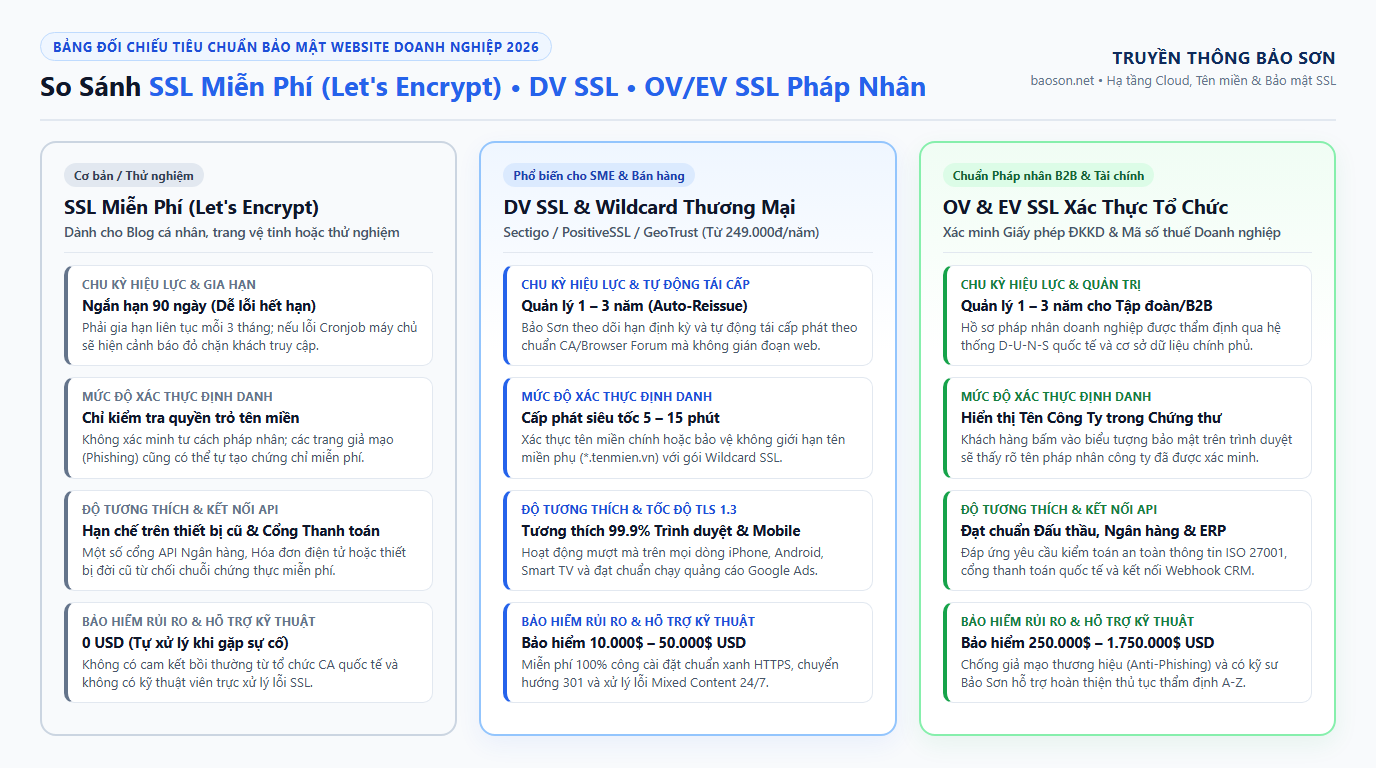
| Comparison Criteria | Free SSL (Let’s Encrypt / ZeroSSL) |
Commercial SSL Domain Name Validation (DV SSL / PositiveSSL / GeoTrust) |
Commercial SSL Authenticates Legal Entities (OV SSL & EV SSL Enterprise) |
|---|---|---|---|
| Reference investment costs | 0 VND (Free allocation, self-management of technology) | From 249,000 VND / year (Including full installation & monitoring package at Bao Son) | From 1,850,000 VND – 4,500,000 VND / year (Depending on OV or EV appraisal level) |
| Management Cycle & Renewal | Expires after each 90 days. If the automatic process (Cronjob) on Hosting gets stuck or changes DNS via Cloudflare, the website will suddenly report an expired error. | Register cycle 1 to 3 years. Bao Son technical team manages the periodic re-issuance schedule (Auto-Reissue) to ensure smooth operations. | Register cycle 1 to 3 years accompanied by legal entity records authentically stored at the international CA organization. |
| Information displayed in Digital Certificate | Show only domain names; There is no ownership information. | Displays protected domain names and international trade allocation organizations (Sectigo / DigiCert). | Clearly display Company Name, Headquarters Address & Country has been verified by the business registration agency. |
| Browser Compatibility & API Port | Good on new browsers, but sometimes encounter root authentication chain (Root CA) errors on old devices or some enterprise API gateways. | 99.9% compatible any computer browser, iOS/Android phone, embedded browser in Zalo/Facebook and payment gateway. | 99.99% compatible and meets strict cybersecurity audit standards of banks, multinational corporations and bidding documents. |
| Risk insurance fund from the issuer (CA Warranty) | Insurance limit does not apply (0 VND). | Equivalent limit ~250 million to ~1.25 billion VND for validation errors from the publisher. | Equivalent limit ~6.2 billion to ~43 billion VND protect commercial transactions. |
At Bao Son, we always give very realistic advice based on the actual scale of our customers:
• When is free SSL enough for you? If it is just a personal blog, an internal testing site (Staging) and you are placing it on a Hosting infrastructure with a technician to monitor automatic renewal.
• When do you only need the SSL service package of 249,000 VND/year? With more than 85% of small and medium enterprises (websites introducing companies, commercial sales, running Google Ads, real estate, furniture, mechanics), You only need to invest in a genuine SSL service package (249,000 VND/year — equivalent to 20,000 VND/month) You have the same 256-bit encrypted transmission as large corporations and don't have to worry about the website crashing midway while running ads.
• When do I need to buy OV/EV SSL for a few million dong? Only if your company operates in the fields of finance, SaaS software, healthcare, large e-commerce platforms or foreign partners/bid documents require the company's legal name to be displayed inside the digital certificate.

Installation Process, Mixed Content Error Handling and Technical Standard SSL Maintenance
In order for an SSL security certificate to function fully without losing SEO keyword rankings or causing image loss errors after installation, the technical implementation process must complete 4 steps: initializing the CSR code & validating the domain name, installing the certificate with the CA-Bundle chain, configuring a 301 redirect from HTTP to HTTPS, and thoroughly checking for mixed content errors.
There are many cases where website owners buy SSL certificates and install them on the server, but the lock icon on the browser still shows a yellow exclamation mark warning. Below is the standard 4-step process that our engineering team applies when implementing Price list and genuine SSL security certificate registration service for customers:
- Initialize key pair (Private Key & CSR) and authenticate ownership: Engineers generate 2048-bit or ECC authentication request (CSR) codes right on the server and perform quick authentication via DNS records (CNAME/TXT) without interfering with running code.
- Fully install the set of 3 files (Certificate + Private Key + Intermediate CA Bundle): A common mistake of people new to SSL installation is to only paste the main certificate file but forget the intermediate certificate file (CA-Bundle). Without CA-Bundle, viewers on Windows computers can still access the website normally, but customers who click on the link from Android phones or Zalo applications will receive an unreliable certificate error.
- Set up redirects
301 Permanent Redirectand update Sitemap: After enabling HTTPS, the configuration engineer permanently 301 redirects the entire pathhttp://old and luxurioushttps://new, and update the card at the same timeCanonicaland redeclar the Sitemap on Google Search Console to preserve 100% of the accumulated SEO power. - Thoroughly scan and handle Mixed Content errors: On websites that have used WordPress source code for a long time, many product image links and icon files (Font/CSS/JS) in the database still store the address.
http://old. Bao Son engineer will run the tool to review and synchronize all internal resources tohttps://so that the browser displays the complete security status.
| Common SSL Error Situations On Websites | Identification Signs On The Browser | Actual Technical Cause | How to Quickly Fix at Bao Son |
|---|---|---|---|
Certificate expired errorNET::ERR_CERT_DATE_INVALID |
Full page white/red blocking screen: “Your connection is not private”. | The 90-day free SSL certificate cannot be renewed or the paid SSL certificate has passed its expiration date. | Issue a new genuine DV SSL certificate and install it on the server within 10 – 15 minutes. |
Mixed content errorMixed Content Warning |
The website can still be opened https:// but the security lock icon is missing or the defective product image is not displayed. |
The article or interface still contains image paths and script files called through the protocol http:// no encryption. |
Run the command to normalize the URL database https:// and turn on the mechanism Upgrade-Insecure-Requests. |
Error missing intermediate certificateERR_CERT_AUTHORITY_INVALID |
Viewing on the computer is normal but opening it on the phone or browser in Zalo gives a security error. | Install missing intermediate certificate chain (Intermediate CA Bundle) on Nginx/Apache/LiteSpeed. | Fully load the international standard CA Bundle Fullchain chain and check to get an A/A+ score on the SSL Labs tool. |
Redirect loop conflict errorERR_TOO_MANY_REDIRECTS |
The website fails to load and reports an error “This page is not working – redirected you too many times”. | Configuration conflict Flexible SSL on Cloudflare and force an HTTPS redirect on the origin server. |
Sync mode Full (Strict) SSL on Cloudflare and standardize configuration files .htaccess / wp-config.php. |
If your website is experiencing one of the above problems or is infected with Redirect Malware, you can immediately contact the technical department via In-depth website maintenance and repair services or refer to the solution SEO standard website design Built-in secure SSL right from the start.
Frequently Asked Questions About SSL Security Certificates for Websites
Not only does it not reduce rankings, but it also helps improve Google's page experience rating if converted properly. When installing SSL at Bao Son Communications, the engineer will configure 301 redirect (Permanent Redirect) of each old link to the corresponding HTTPS link, update the Canonical and Sitemap tags so that Google can fully transfer the keyword rankings.
Absolutely. Genuine SSL security certificates (Sectigo, PositiveSSL, GeoTrust, DigiCert) operate independently of the domain name or hosting provider. Whether your server is located anywhere domestically or internationally, Bao Son's engineering team supports initialization and complete installation 100% free of technical labor.
For domain name authentication certificates (DV SSL and Wildcard DV SSL), the entire process from validating DNS records to completing installation on the website only takes about 10 to 15 minutes. For business legal entity authentication certificates (OV SSL and EV SSL), the appraisal time for business registration documents from international organizations is usually from 1 to 3 working days.
According to the new security roadmap of the CA Association/Browser Forum applied from the period 2026–2029, the technical validity cycle of each SSL certificate issuance will gradually shorten to enhance cryptographic security. When registering for an annual SSL package at Bao Son, businesses do not need to worry about this technical operation because our system and engineers will perform periodic re-issuance (Auto-Reissue) completely free of charge throughout the contract term.
You just need to send your website domain name via Zalo (+84) 987 838 199 or enter your phone number in the consultation box below. Bao Son Communications' system technicians will check for free with a specialized toolkit (checking certificate expiration, TLS 1.3 protocol, CA-Bundle chain on mobile devices and Mixed Content errors) and then send detailed results after just 5 minutes.