





550 5.7.26. The root cause of 90% of these cases lies in the fact that the new domain name only points to the MX record to receive mail, but forgets the step Configure SPF, DKIM, and DMARC records on the DNS system.
Previously, just create a mailbox account and point the MX record so sales staff could send and receive emails normally. But in the past few years, the story has been completely different.
Since Google, Yahoo and Microsoft have tightened their anti-spam and business impersonation scams, any domain name lacking a valid authentication signature is marked as an "unidentified sender". This article summarizes the correct testing process and sets up a set of 3 authentication records that our technical team Bao Son Media is being deployed directly to SME and B2B businesses in Vietnam.
Four incidents caused corporate emails to fall into Spam despite purchasing their own domain name
When handling problems for import-export companies, industrial material manufacturers or private clinics in Hanoi, Bao Son's technical team often encounters the following four recurring situations:
Lack of Declaration
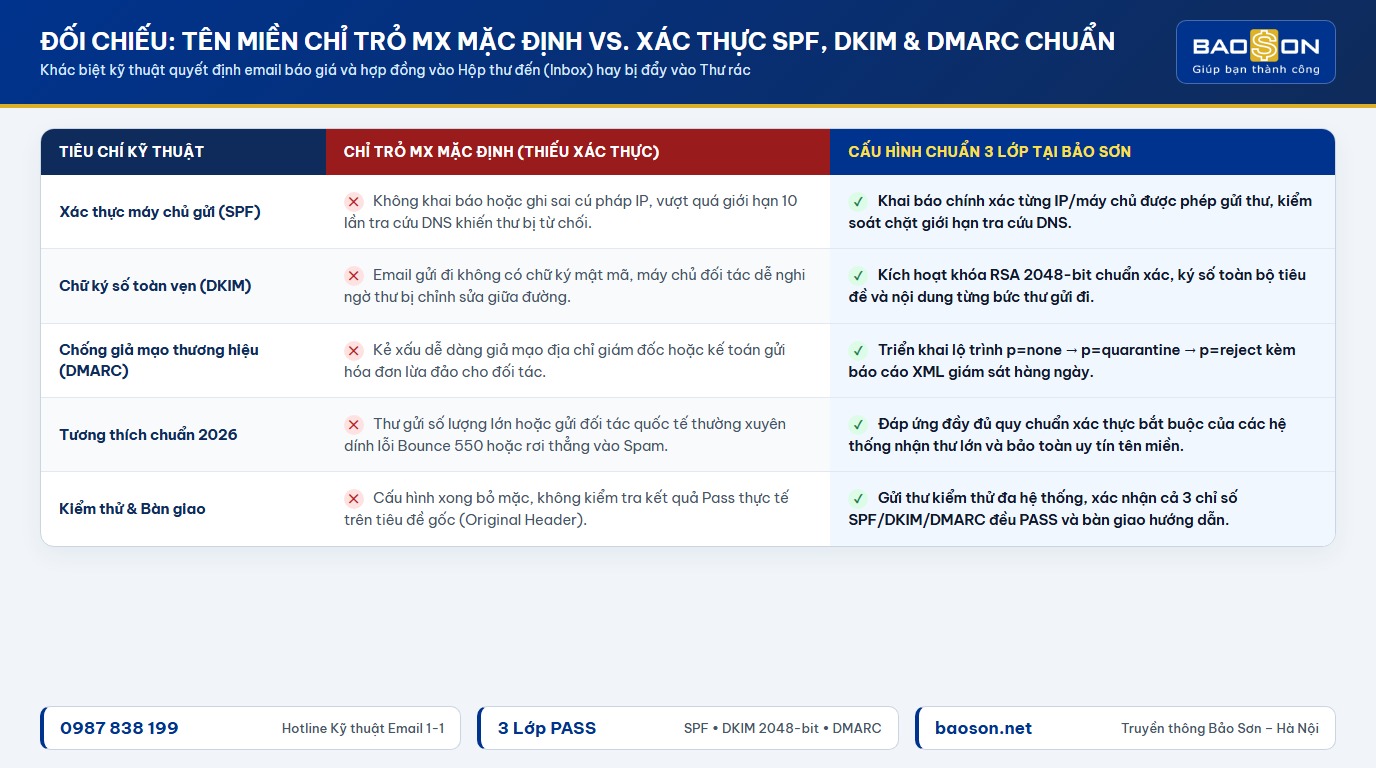
Leave SPF, DKIM or DMARC completely blank
The web designer or old administrator points to the MX records when handing over the domain name. The customer's mail receiving system does not know which server is authorized to send mail on behalf of your company, so by default it pushes the quote straight to the Spam folder.
Duplicate Records
Declare two SPF TXT lines on the same domain name
Many businesses use corporate email in conjunction with invoicing software or newsletter sending tools, so IT staff creates a line v=spf1... second on DNS. According to technical standards, the existence of two or more SPF records will cause both to be invalidated immediately.
Exceeding the Lookup Threshold
SPF records exceed 10 DNS queries
Every command include: In the SPF record, there are many nested layers of IP addresses inside. When the total number of lookups exceeds 10 times, the recipient server reports an error PermError and refused to authenticate the letter even though the syntax seemed correct at first glance.
Internal Tampering
Fraudulent invoice sent by impersonator
When the domain name has not turned on the DMARC policy or has just been set to loose tracking mode, bad actors can build a server to fake the accounting address and send a notice of changing the payment account number to your partner without any warning from the receiving system.

Correctly understand the roles of SPF, DKIM and DMARC in actual operations
If explained in the easiest business language, sending a quote email to a partner is like sending a set of confidential documents with a company seal. In order for the partner's office to open to receive documents and place them on the director's desk, your domain name needs to have three layers of clearance paper below:
SPF record: List of servers licensed by the company to send mail
SPF (Sender Policy Framework) is a TXT text record placed on the domain DNS, listing exactly which IP addresses or service servers are allowed to send mail with the extension @tencongty.vn. For example, if you are using Google Workspace business email With additional accounting software for electronic invoicing, both of these sending sources must be merged into one standard SPF line.
DKIM record: Hybrid seal prevents message content modification
DKIM (DomainKeys Identified Mail) attaches to each outgoing email a cryptographic signature generated from a secret key on the sending server. The receiving server will compare that signature with the public key that you publish on DNS. As long as the quote content, bank account number or attachment is tampered with by someone on the transmission line, the signature immediately loses its match and the letter is blocked.
DMARC record: Rules to handle when impersonation messages are detected
There is SPF and DKIM, but without DMARC, the recipient server is still confused about how to handle a message impersonating your brand. DMARC acts as a gatekeeper issuing a definitive order: if the message both does not match the actual sending domain and fails the authentication check, just follow (none), pushed straight to spam (quarantine), or outright refuse at the gate (reject) and send the report to the admin mailbox.
Five-step process to configure SPF, DKIM & DMARC records correctly
Whether the business is operating on the platform Microsoft 365, Google Workspace or system Business Email Hosting Running directly on a private server, the correct setup process must always follow the five steps below to avoid interruption of the daily mail flow.
| Stage | Configuration category on DNS | Bao Son's control standards |
|---|---|---|
| Step one | Inventory all mailing sources that are using the company domain name extension | List all employee mailboxes, website contact forms, electronic invoice software and customer care tools |
| Step two | Include and publish exactly one SPF TXT record at the domain root (@) |
Use compact syntax, keep the total number of DNS lookups under 10, and end with ~all during the review period |
| Step three | Generate a standard 2048-bit DKIM key in the mail admin page and point to the DNS record | Give the selector the correct name (eg google._domainkey or default._domainkey), confirm the Activate button is green |
| Step four | Create TXT record at _dmarc Start with policy p=none |
Collect XML reports for 7–14 days to ensure you don't miss a valid sending server before upgrading p=quarantine or p=reject |
| Step five | Practical test on root header and PTR (Reverse DNS) record synchronization | Send a test message to your personal mailbox, check the Original Message section to confirm all three indicators of SPF, DKIM and DMARC meet the status. PASS |
To help you easily visualize the actual structure when opening the domain DNS administration panel, below is a standard record sample set for a business using Google Workspace combined with sending notifications from a private web server:
v=spf1 ip4:103.166.184.37 include:_spf.google.com ~all
2. DKIM record (Type: TXT | Host: google._domainkey)
v=DKIM1; k=rsa; p=MIIBIjANBgkqhkiG9w0BAQEFAAOCAQ8AMIIBCgKCAQEA…
3. DMARC record (Type: TXT | Host: _dmarc)
v=DMARC1; p=quarantine; pct=100; rua=mailto:baocao-dmarc@tencongty.vn; sp=quarantine; aspf=r; adkim=r
A small but often overlooked detail: when the company website has a contact form that sends notifications to the director's email via WordPress's default mail function, the web server is also acting as a sender with your domain name. If not declare the IP address of the packet High-speed hosting Enter the SPF line above or switch the website form to send via authentic SMTP port, customer quotation letters sent from the web can easily fall into your own trash.

Bao Son system engineers support infrastructure testing and transfer all Website/Email data safely in 30 minutes without interruption.
Four silly errors caused the configuration to be completed but emails were still returned
Many people find documents online to paste each line of records into DNS, check online tools and see all the green reports, but the next morning when they send the contract to the partner, the mail is still returned. From the perspective of actual troubleshooting at Bao Son, it is often the result of four technical errors that are difficult to detect with the naked eye:
- Turn on the DMARC button
p=rejecton the first day: If you have not checked all third-party software (such as CRM software, invoicing software, website forms) that are sending mail on behalf of the company, placing an order immediatelyp=rejectcausing all electronic invoices sent to customers to be deleted directly by the partner server before reaching the mailbox. - Forgot to cut the 2048-bit DKIM keystring on the old DNS table: The 2048-bit key is approximately 400 characters long, exceeding the 255-character limit for a single string of the traditional DNS protocol. Many domain name providers in Vietnam require separating the key string into two segments enclosed in quotation marks, or removing extra spaces when pasting into the value box.
- Missing Reverse DNS record (PTR) synchronization for private mail server: If a business that operates its own Email Hosting or VPS server sends mail without declaring a PTR reverse resolution record that matches the host name (Hostname) in the HELO/EHLO greeting, international anti-spam filters will severely deduct trust points.
- Copy wrong character
-allwhen sending flow is not controlled enough: Characters-all(Hard Fail) orders absolute denial of all IPs outside the list, while~all(Soft Fail) helps mark doubts so that DMARC can handle them more smoothly. If an employee is on a business trip and sends mail through a secondary server that has not yet been added,-allwill mistakenly block important work messages.

How to quickly check the cleanliness of your company email in three minutes
After completing the configuration on the DNS management page and waiting about 15–30 minutes for the record to update, you don't need to guess but can check it yourself immediately with the three simple steps below. If your business is planning Convert email system to new platform, this acceptance step is even more mandatory before handing over to personnel for use.
- Send an email with the actual PDF attachment to a personal Gmail inbox: Don't just send a blank "test" line because spam filters score differently between a blank message and one containing an employee's signature, a website link, and a quote attachment.
- Open the "Show Original" section in the mail receiving interface: Observe the summary table at the top. All three lines
SPF,DKIMandDMARCtext must be displayedPASSInclude your company's correct domain name. If any line saysFAILorSOFTFAIL, hãy dừng gửi hàng loạt để kiểm tra lại ngay. - Kiểm tra điểm danh tiếng IP và tên miền trên công cụ tra cứu danh sách đen: Đảm bảo địa chỉ IP máy chủ gửi thư không nằm trong các danh sách cảnh báo quốc tế (như Spamhaus hoặc Barracuda). Nếu phát hiện IP bị dính bẩn từ trước, anh chị cần liên hệ đơn vị cung cấp dịch vụ email đổi sang dải IP sạch hoặc định tuyến thư qua cổng SMTP trung gian uy tín.
Answers to frequently asked questions about SPF, DKIM and DMARC configuration
v=spf1... hiện có trên DNS, chèn thêm cụm include:ten-mien-nha-cung-cap hoặc dải ip4: của phần mềm hóa đơn vào ngay trước cụm ~all. Nếu tổng số lượng máy chủ gửi vượt quá 10 lần tra cứu DNS, nên tách luồng gửi hóa đơn sang một tên miền phụ riêng (ví dụ @thongbao.tencongty.vn).p=none trong 1 đến 2 tuần đầu để đọc báo cáo XML xem có phần mềm nội bộ nào bị cấu hình sót không. Sau khi xác nhận toàn bộ luồng gửi hợp lệ đều đạt PASS, mới nâng lên p=quarantine (cách ly thư lạ vào thư rác) và cuối cùng khóa chặt ở mức p=reject để chặn đứng 100% thư giả mạo thương hiệu.