





1. 4 Conditions to Prepare Before Creating a Google Ads Campaign
In order for the installation to go smoothly and your account not to be unexpectedly suspended, you need to fully prepare the following 4 elements:
- Google account (Gmail): You should use a genuine Gmail account with 2-layer security (2FA) enabled to avoid security risks.
- Valid international payment cards: Visa or Mastercard Debit/Credit card with international online payment feature enabled, with minimum available balance of 100,000 - 200,000 VND for account verification.
- Standard conversion landing page (Website / Landing Page): The website must have fast loading speed, complete contact information, purchasing policies and display beautifully on mobile phones.
- List of target keywords: Collection of keywords that potential customers often use to search for your product or service on Google.
2. 7-Step Process of Self-Installing Google Ads Campaign with Real Battle Standard 2026
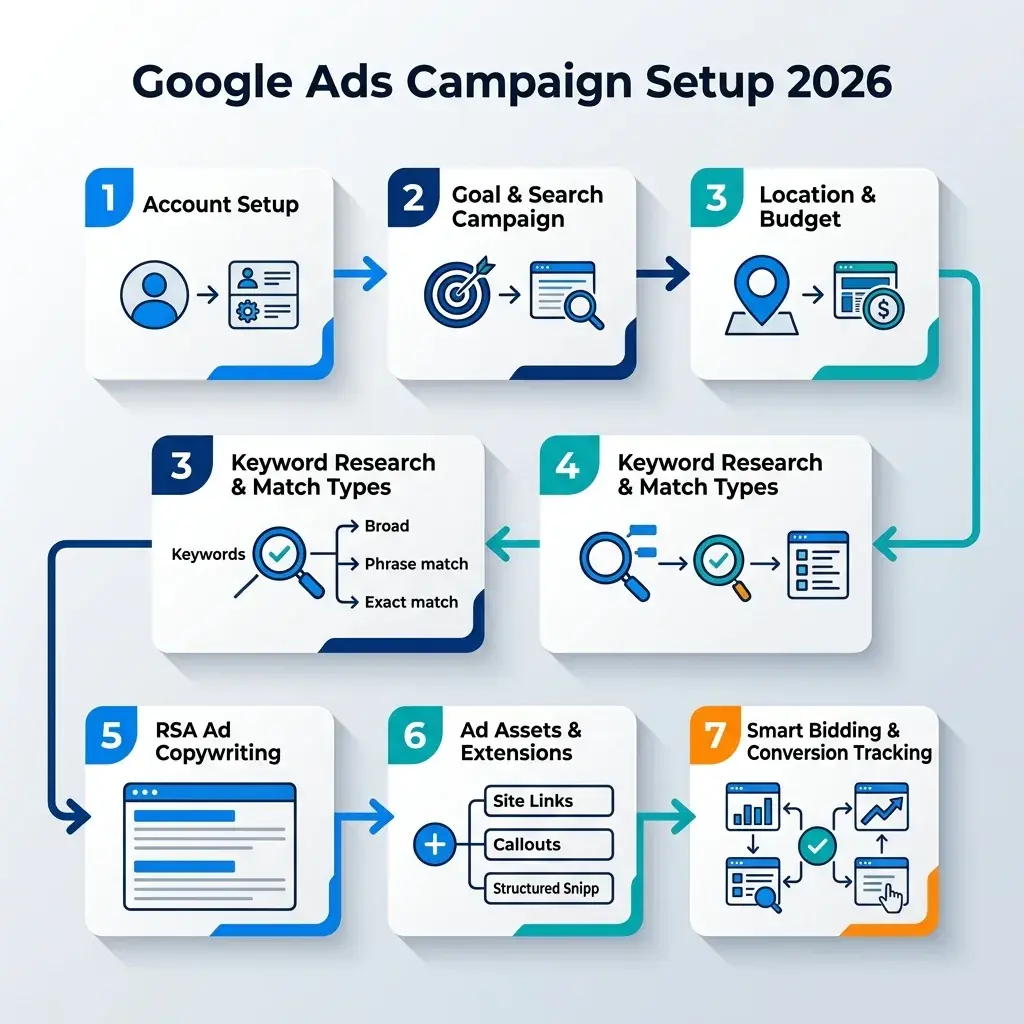
Step 1: Access & Create New Advertising Account
You access Google's official link: ads.google.com, log in with your Gmail. At the initial interface, select mode “Switch to Expert Mode” in the bottom corner for full customization of advanced parameters.
Step 2: Choose Campaign Objective & Campaign Type
Google Ads offers many different types of goals:
- Potential customers (Leads): Most suitable for service, B2B, and consulting industries that need a phone number or registration form.
- Sales: Suitable for e-commerce websites with online payment carts.
- Website Traffic: Website Traffic: Aim to attract more readers to your blog or website.
Regarding campaign type, for starters, choose type Search Campaign to anticipate user needs.
Step 3: Geographic, Language Targeting & Budget Setting
- Geographic location: Choose the area you can actually serve (for example, only Hanoi, Ho Chi Minh City or Nationwide). Remember to select the location option as “People who are in or regularly in the targeted locations” to avoid wasting budget for people abroad.
- Language: Select both Vietnamese and English (because many users in Vietnam install computer/phone operating systems in English).
- Daily budget: Set the maximum amount you are willing to spend per day (e.g. 150,000 VND/day).
Step 4: Research Keywords & Ad Grouping Carefully
Use tools Google Keyword Planner (Keyword planning tool) free in Google Ads Tools to look up monthly search volume and expected bids.
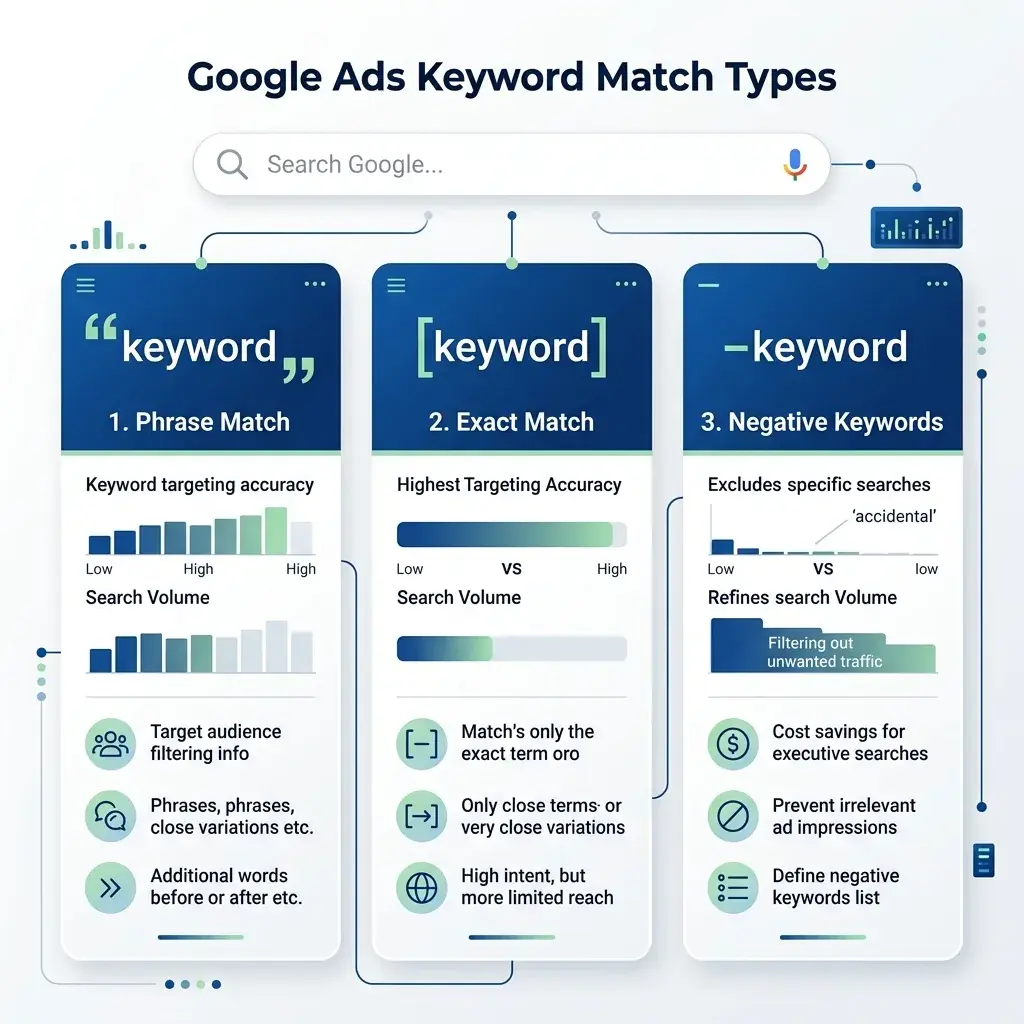
Golden rule: ABSOLUTELY DO NOT USE SINGLE BROAD COMPARISONS! Use a combination of the following two match types:
- Phrase Match – Symbol in quotes “keyword”: For example:
"thiết kế website giá rẻ". The ad only appears when the user's search query contains the entire phrase in the correct order of meaning. - Exact Match – Symbol in square brackets [keyword]): For example:
[thuê hosting uy tín]. Ads only show when users type this exact phrase or a very close variation.
Step 5: Write Responsive Search Ads (RSA)
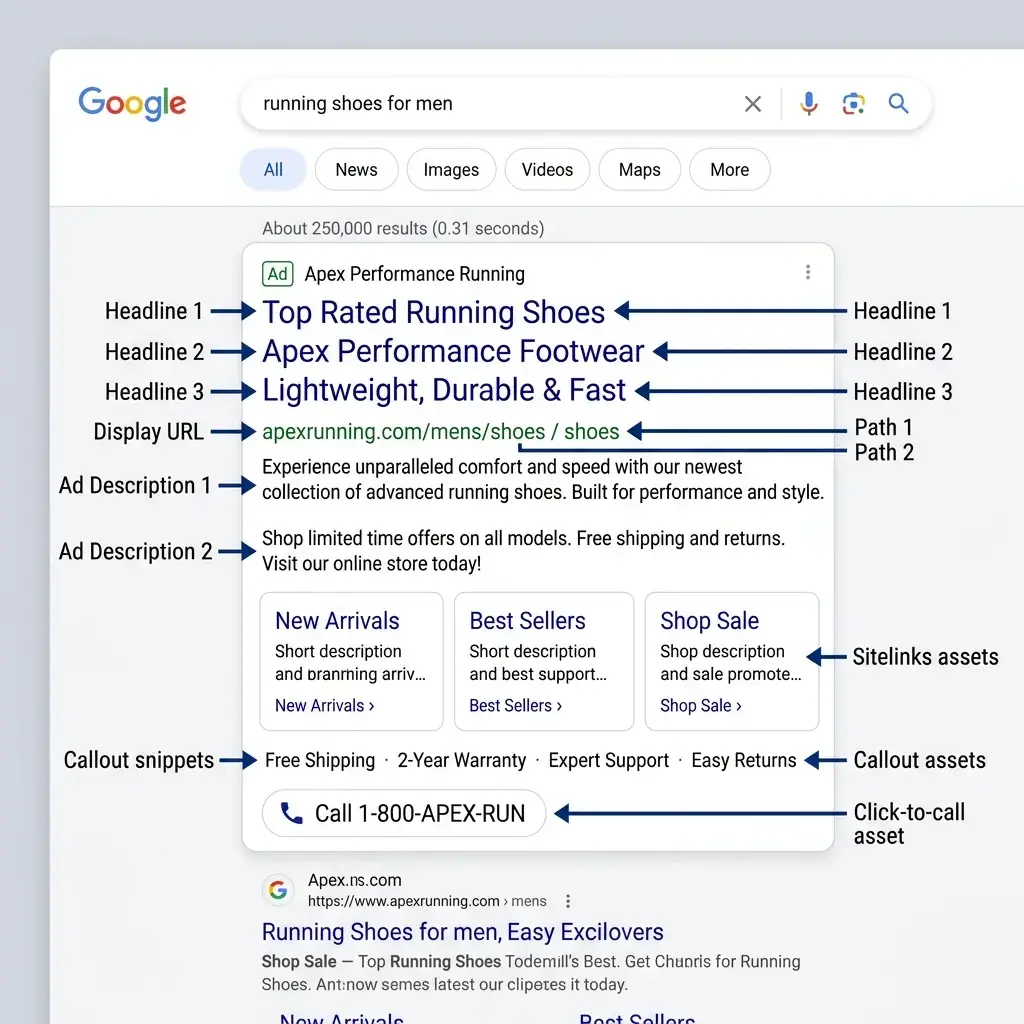
Google Ads now uses the responsive search ad format. You need to prepare:
- 15 Headlines – maximum 30 characters/line: Need to contain main keywords, outstanding benefits, impressive numbers and calls to action (CTA) such as: “On-Site Price Quote in 5 Minutes”, “Committed to Handover within 48 Hours”.
- 4 Description lines (Descriptions – maximum 90 characters/line): Clarify warranty policy, quality commitment, bonus incentives and contact hotline number.
- Obtain Ad Strength: Good or Excellent to be prioritized by Google to display with lower bids.
Step 6: Install Full Extension Components (Assets)
The extension helps your ad to double in size on the screen, taking up the entire area and attracting all eyes:
- Call Assets: Display hotline number with call button right on the mobile phone.
- Sitelinks widget: Leads to important subpages such as Price List, Introduction, Typical Customers.
- Callout Assets: Emphasize commitments such as: 24/7 support, 24/7 technical warranty, 100% transparent.
Step 7: Set Up Bid Strategy & Publish Campaign
- For new campaigns without conversion data: Choose a bid strategy Maximize Clicks and set a maximum bid limit (Max CPC) to avoid being charged too much.
- After the campaign collects more than 30 conversions/month: Switch to strategy Maximize Conversions or Target CPA (Target CPA) Let AI automatically optimize orders.
3. 4 Secrets to Improve Quality Score to Save 50% of Costs
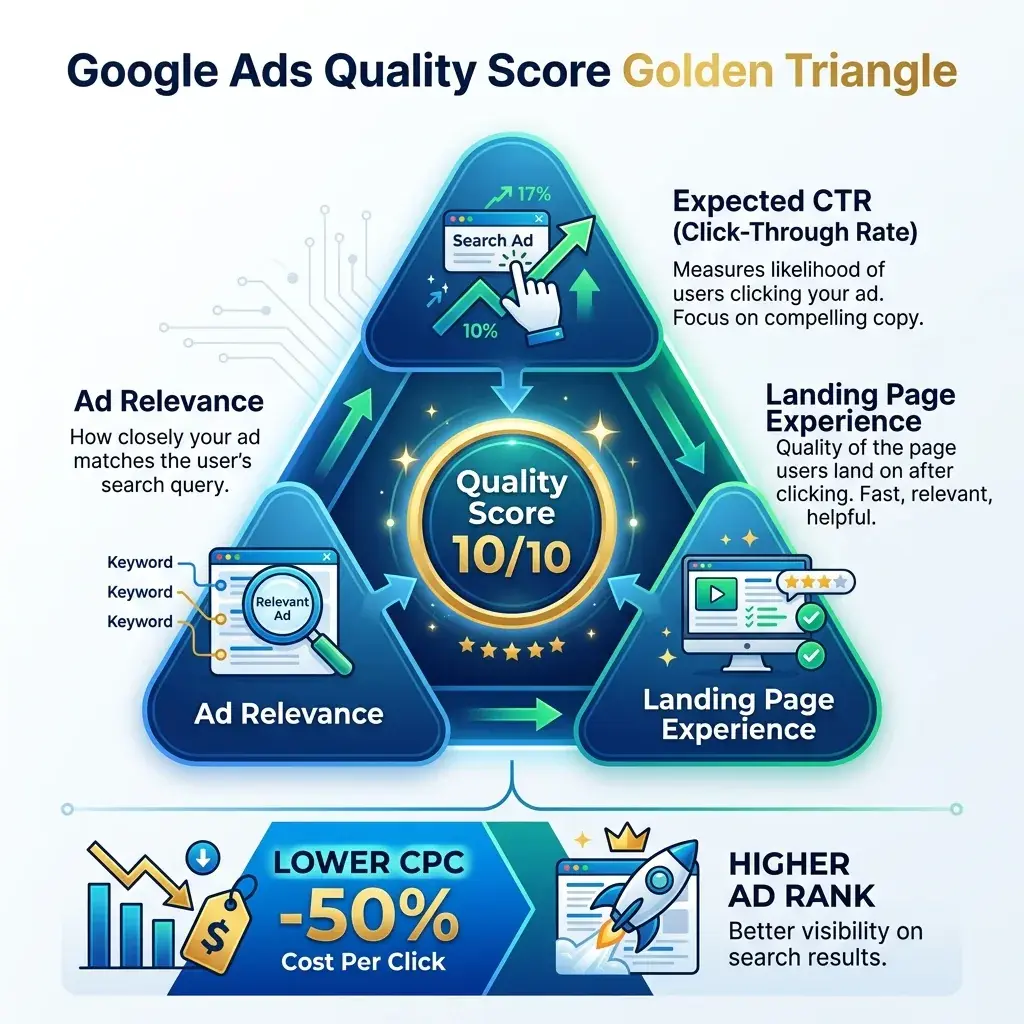
Quality score (scale 1-10) is the index that directly determines the amount you pay for each click. To score 8-10/10, you need to ensure the "golden triangle" synchronization:
- 1. Expected CTR: Write an ad that is sensational, attractive, and closely tied to keywords.
- 2. Relevance of advertising (Ad Relevance): Keywords appear naturally in headline 1 and headline 2.
- 3. Landing Page Experience: Website content must solve the exact problem customers are looking for, load speed under 2 seconds and be 100% mobile standard.
- 4. Add negative keywords weekly: Go to the “Search Terms” tab, filter out non-purchase keywords and click “Add as negative keywords” immediately.

Google Ads experts at Bao Son support campaign review, quality optimization & realistic Google Ads budget planning.
4. Checklist of 7 Steps to Self-Run Google Ads for Beginners
5. Frequently Asked Questions (FAQ) When Installing Google Ads Yourself
Q1: How long does it take for a newly created account to be approved for advertising?
Answer: Normally, Google Ads ads are automatically approved by the system within 1 to 2 hours. In the case of sensitive industries (healthcare, finance) it may take up to 24-48 hours.
Q2: Why don't my ads appear when I search on Google?
Answer: It could be because your account is running out of daily budget, your bid is lower than your competitors, your location is not in the targeting area, or you have searched too many times without clicking, making Google understand that you are not interested in that ad model.
Q3: Should we use the Smart Bidding feature from the beginning?
Answer: Should not. New accounts do not have conversion data yet, so Google's AI cannot learn customer behavior. We recommend starting with a manual Maximize Clicks strategy for the first 2-4 weeks.
Q4: Can one Google Ads account run ads for many different websites?
Answer: Technically it is possible, but it is recommended to separate each website/business into a sub-account in MCC for transparent budget and tax invoice management.
Q5: If I encounter an error that my account is suspended due to "Suspicious Payment", what should I do?
Answer: Check to see if the name on the bank card matches the account registration name, take a photo of the card (covering the middle 8 numbers) and submit an official protest via Google's help page.