





Imagine that your company has just sent a contract quote of several hundred million to a partner, but the sender's address is a custom name. congtyxaydungminhphat88@gmail.com or kinhdoanh.noithat123@gmail.com. Not to mention the fact that the partner already sees a lack of trust, the bigger risk lies in the fact that next month that salesperson quits his job, taking with him the mailbox password and the entire customer transaction history to a rival company. In fact, there have even been many cases where crooks created a similar Gmail address (only changing one digit) to send fake notices asking customers to transfer deposits to another account number.
That's why any business that has been operating properly needs to use an email address with its own domain name (for example: lienhe@tencongty.vn). The good news is that if your company is just starting out or has a scale of less than 5 employees and needs to save costs, you absolutely can. create free business email 100% without monthly maintenance fees. In this article, the technical team at Bao Son Media & Trading Co., Ltd. will guide you step by step on how to do it in practice, clearly stating the pros and cons of each option and configuration tips to minimize sending messages from falling into the Spam folder.
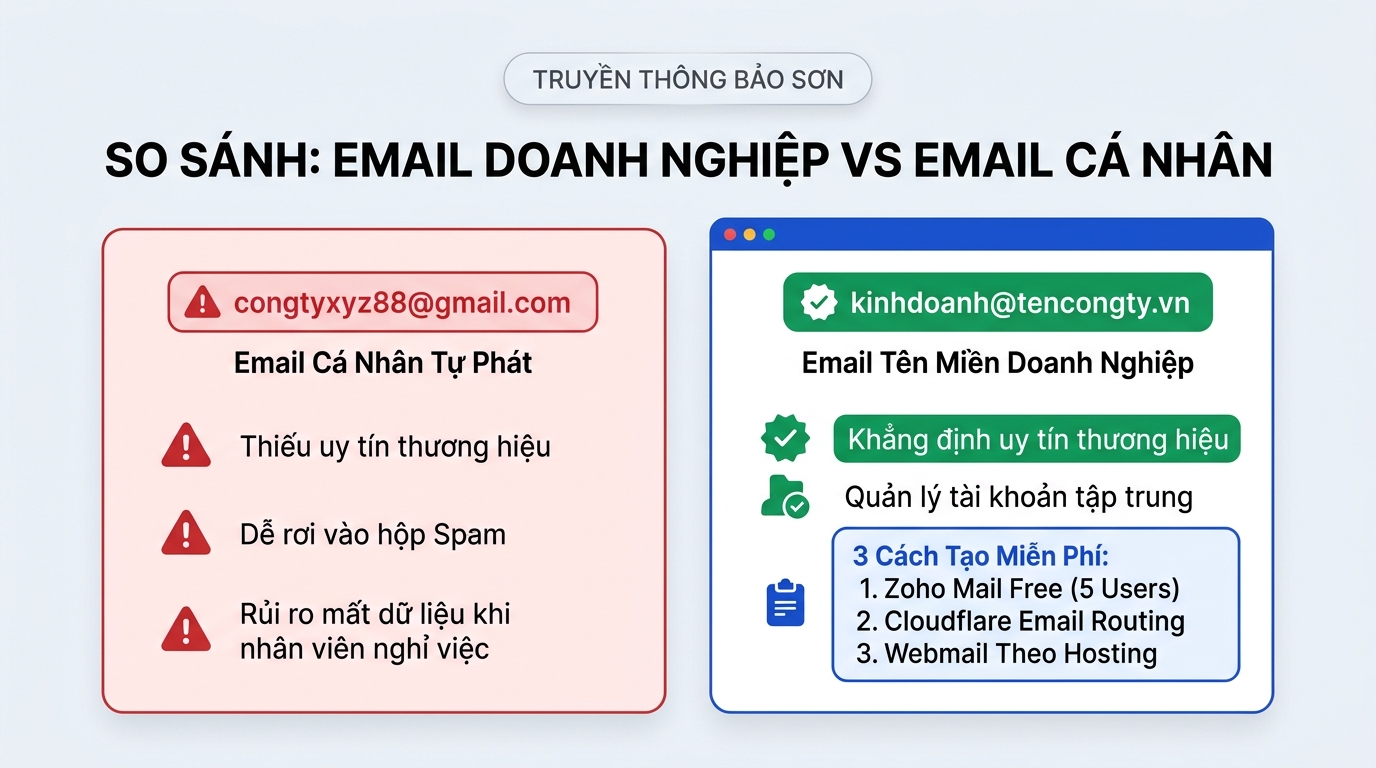
🎯 Quick summary of 3 ways to create free company domain email today:
- Method 1 — Use Zoho Mail (Forever Free Package): Create maximum 5 permanently free accounts (
5GB/user), has a separate mailbox interface on the browser and phone application. - Method 2 — Using Cloudflare Email Routing + Gmail: Create Unlimited number of domain email addresses and automatically collect all sent messages to your familiar personal Gmail inbox.
- Method 3 — Take advantage of the Webmail available in the Hosting package: If the company has hired Hosting runs the website, you can go right to the dashboard
cPanelorDirectAdminto open a free email account in 2 minutes. - Important technical note: No matter how you create it, you must configure 3 authentication records (
MX,SPF,DKIM) in the domain management section, mail sent to new customers goes straight to the main mailbox (Inbox).
Why should small companies immediately give up the habit of using personal Gmail for transactions?
Many business owners who have just opened a company often think: “On our side, there are a few brothers working together, just making a temporary tail @gmail.com Use it quickly, when the company gets big, you'll figure it out later.". However, through the practice of providing technical support to hundreds of businesses in Hanoi, Bao Son realized that this habit has three very close risks:
- If an employee quits their job, their customer data will be lost: When letting sales staff set up personal Gmail to work with customers, you absolutely do not have ultimate administrative rights (Admin). When an employee quits or there is a dispute, they change their password and the company loses all quotes, contracts and partner contacts.
- Losing points right from the round of submitting competency profiles: When you send quotes to large businesses, industrial parks, foreign corporations or state agencies, their purchasing department always prioritizes checking the brand email extension. An email ending in
@tencongty.vnProve your business has a clear legal entity and ownership Official company website. - Unable to create decentralized addresses by department: With your own domain email, you can easily create standard addresses such as
ketoan@...(send VAT invoice),kinhdoanh@...(receive quote request),tuyendung@...(receive candidate applications). Whoever is in charge of any department will hand over that account. If personnel changes, the customer contact address remains the same.
What do you need to prepare before creating a free business email?
To avoid misunderstandings and wasting your time, Bao Son needs to clarify one point from the beginning: “Free” here means free monthly mailbox management server software, but to have the tail @tencongty.vn or @tencongty.com behind, you must be available 2 basic conditions after:
- A working private domain: If your business has already created a website, you already have this domain name, you don't have to buy more. If you don't have one, you just need to register for one cheap domain names (cost is just over 200,000 VND - 300,000 VND for a whole year of use).
- Account to log in to the domain's DNS administration page: This is where you purchase your domain name (or Cloudflare account if you're pointing your domain name through Cloudflare). You will need to go here for about 10 minutes to paste the authentication code lines issued by your email provider to prove you are the real owner of that domain name.
Instructions on 3 ways to create the most stable free business email today
Before 2022, Google used to have a free G Suite Legacy package, but now that package has been permanently closed (Google Workspace currently only offers a 14-day trial and then charges). So here it is 3 ways to create truly free business emails The most stable operation that Bao Son technical team recommends you apply:
Method 1: Create forever free business email with Zoho Mail (Up to 5 users)
Zoho Mail is currently the rare major supplier in the world that still maintains the package Forever Free Plan (Free for the duration of use) for small businesses. This package allows you to create max 5 user accounts (each person 5GB Maximum storage capacity, file attachments 25MB), the Vietnamese interface is very clean and has no ads.
Important tips when registering to avoid mistakenly clicking on a paid package:
- Step 1 — Choose the right Forever Free package: When entering Zoho Mail's pricing page (
zoho.com/vi/mail/zohomail-pricing.html), the naked eye will only see paid plans above. Please Scroll down to the bottom of the price list, look at the box below and you will see the text “Forever Free Plan” then press the button Register now in that box. - Step 2 — Declare your company domain name: Enter your domain name (e.g.
congtycuaban.com), fill in full name, phone number to receive OTP code and create the first administrator address (for example:admin@congtycuaban.com). - Step 3 — Verify the domain owner: Zoho will provide you with 1 line of code
TXT(starts withzoho-verification=...). Open your domain's DNS management tab and add a type recordTXT, name (Host) to be@, paste that value and then go back to Zoho and click Verify. - Step 4 — Point MX records to receive mail and create staff accounts: After verification is complete, you add 3 records
MXaccording to the Zoho parameters displayed on the screen (mx.zoho.comwith priority10,mx2.zoho.comprioritize20andmx3.zoho.comprioritize50). So you can create 4 more accounts for employees and log in to send and receive mail right on the webmail.zoho.comor download the Zoho Mail app to your phone.
Method 2: Create unlimited email domains with Cloudflare Email Routing (Collect to personal Gmail)
If you are familiar with the Gmail interface and want to create 10 or 20 email addresses with different domains without remembering many passwords, Cloudflare Email Routing is an extremely smart and 100% free solution.
- Step 1 — Transfer domain DNS management to Cloudflare: Sign up for a free account at
cloudflare.com, add your domain name and change the Nameserver pair according to Cloudflare's instructions. - Step 2 — Enable Email Routing: In Cloudflare's left menu, click on item E-mail → Email Routing → select Get Started.
- Step 3 — Create a domain email address and choose a recipient: At the box Custom address, you type the email name you want to create (for example:
baogia@tencongty.vn). At the box Destination address, enter your personal Gmail address. Cloudflare will send a confirmation email to your Gmail; Open the email, confirm and press the button Add records and enable let Cloudflare automatically install the entire recordMXandSPFwith just 1 click. - Step 4 — Configure sending mail from Gmail under the company domain: So that when you click to reply to the customer, the recipient sees the sending address is
baogia@tencongty.vn(not personal Gmail), go to your Google account and turn it on App Password 16 characters, then enter Gmail Settings → Accounts and Import → Send mail using another address, enter serversmtp.gmail.com(gate587) with the newly created application password and you're done.
Method 3: Create free business email right on Hosting running Website (cPanel / DirectAdmin)
Many business owners have rented packages High quality hosting to make a website but forgot the built-in feature of creating emails by domain name. This method does not require any additional third party registration:
- Step 1: Log in to your Hosting admin panel (usually with a path of the form
tencongty.com:2083for cPanel). - Step 2: Find the area E-mail and click on the icon Email Accounts.
- Step 3: Click the button + Create in the right corner. Select the company domain name, enter the account name you want to create (for example:
lienhe), set a password and select mailbox capacity then click Create. - Step 4: To read and send mail, you just need to access the link
tencongty.com/webmailon the browser (using interface Roundcube very light and easy to use) or get IMAP/SMTP parameters displayed right in cPanel to attach to Outlook software on your computer and Mail application on iPhone/Android.

Bao Son system engineers support infrastructure testing and transfer all Website/Email data safely in 30 minutes without interruption.
Technical secrets to help keep free emails from falling into the Junk mailbox (Spam)
A very common situation when business owners create their own free emails is: take your phone and send it to try and receive it immediately, but when sending a quote with a PDF file to the customer, the customer says “I don't see any mail.” — it's time to open the section Spam When I got out, I saw it was in there.

The reason is because the security filters of Gmail and Outlook currently strictly check the sender's identity. If you just pointed the record MX (only works to receive mail) but missing 3 digital signature records below In domain DNS management, major mail servers will suspect fake mail and push it straight to Spam:
- SPF (Sender Policy Framework) record: This is a type record
TXTlocated in the main domain (@). It is like a power of attorney that clearly declares to the world that: “I authorize Zoho / Hosting's servers to send mail under my company domain” (Example with Zoho is:v=spf1 include:zoho.com ~all). Absolute notes are only created only 1 line of SPF record on a domain name; If you create 2 separate SPF lines, it will cause an error immediately. - DKIM electronic signature (DomainKeys Identified Mail): In your Zoho or cPanel admin page, click on the item Email Authentication / DKIM to get the public key and paste it into DNS. With DKIM, each sent letter is stamped with an implicit encryption seal, helping the Inbox rate reach almost absolute.
- DMARC record (
_dmarc): You create 1 more type recordTXTwith the Host name being_dmarcand the underlying value isv=DMARC1; p=none;. It only takes an extra 30 seconds, but this record helps your domain name fully complete the set of 3 international security standards.
Frank comparison table: When can you use the Free version, when should you use Dedicated Email?
As a direct provider of both Hosting infrastructure and Email solutions for businesses, Bao Son always advises sincerely: Not every company needs to spend millions on expensive email packages from day one, but don't try to force the entire company of 15-20 people to use the free version when many important transactions have occurred.

The practical limitations you will encounter with the free plans after a few months of use include:
- Zoho Mail Free package locks Outlook computer connection: Zoho's free plan currently has POP/IMAP/ActiveSync disabled. This means that your accountant or sales staff cannot attach emails to the Microsoft Outlook software on your computer or the iPhone's default Mail application, but must open the Zoho web browser. Furthermore, level
5GBIt will fill up very quickly if your company often sends technical drawings, construction photos or scanned contracts. - Webmail included with Hosting shares the same IP address: When using free email with a regular website hosting package, your email sending IP address is shared with dozens of other websites on the same server. If a neighbor website is infected with malicious code and sends spam, causing that IP to be blacklisted, all emails your company sends to partners will be blocked from being returned immediately.
You can quickly compare the table below to choose the right solution that best fits your budget and company size:
| Actual criteria | Zoho Mail Free / Cloudflare Routing | Bao Son Dedicated Email Hosting | Genuine Google Workspace / Microsoft 365 |
|---|---|---|---|
| Usage costs | Free 0 VND | Very economical (Inclusive package for the whole company) | Charge per employee/month |
| Number of accounts | Up to 5 accounts (with Zoho Free). | Create from 10 – Unlimited accounts according to capacity package. | Flexible from 1 to thousands of employees. |
| Outlook/Phone software connection | Limited (Zoho Free locks IMAP/POP3). | Fully supports Outlook, Apple Mail, iOS/Android phones. | Smooth sync on official Gmail, Outlook & all devices. |
| International sending and receiving stability & Large partners | Pretty good, but limit the number of messages sent out per day. | Separate Spam filtering Email server, clean IP with high reputation. | Meets international standards (99.99%) — includes Google Drive, Meet, Docs. |
| Who should choose this option? | Newly opened stores, individual businesses, and companies with 1-4 people rarely send heavy files. | Small and medium enterprises (5 – 50 employees) want Cheap Email Hosting long-term stability. | The company needs in-depth team work on this Google Workspace or Microsoft 365. |
Answer practical questions when creating your own business email for free
I previously heard that Google allows you to create email by domain name for free. Can I still register?
Permanent free registration is no longer available. The free plan you heard about before is Google Apps / G Suite Legacy has been discontinued by Google since 2012 and officially revoked in 2022. Now when registering Google Workspace, you can only try it for free in First 14 days, then required to pay monthly maintenance fees per user.
I'm using the free Zoho Mail package but later the company has more employees. Will I lose my old mail if I switch to paid email at Bao Son?
Absolutely no letters were lost. When your business grows beyond 5 employees or full capacity 5GB Need to upgrade to Email Hosting or Google Workspace, Bao Son's technical team will support Migrate all old email history and contacts Switching to the new system is 100% free, without interrupting even 1 minute of receiving company mail.
Why do emails I create in cPanel Hosting send to Gmail users get bounced back (Error 550)?
Return error 550-5.7.26 Unauthenticated email This happens because your domain name has not declared a standard record SPF and DKIM, or because you are using an intermediate DNS (like Cloudflare) but only copying records MX but forgot to copy the digital signature authentication record from Hosting to Cloudflare. You just need to go to the section Email Deliverability In cPanel, copy the entire 2 lines of code DKIM and SPF Paste it to the domain name's DNS management page to send mail immediately.
How to receive new mail notifications quickly on your phone with the free Zoho Mail package?
Because the Zoho Free package does not allow logging in via the iPhone's default Mail application or the Gmail application via the IMAP protocol, a convenient way is to go to the App Store (iOS) or CH Play (Android) to download the official application called Zoho Mail – Email and Calendar. This application is completely free, the Vietnamese interface is very smooth and an alarm sounds immediately when a customer sends an email.
I'm not familiar with MX, SPF, DKIM record pointing techniques, can Bao Son help with the installation?
There is dedicated support. If your business is using Website Design, Domain Name or Hosting services at Bao Son, our technicians will Full package configuration support completely free. Even if you bought the domain name elsewhere and are having difficulty setting up DNS records, don't hesitate to text Zalo your number. (+84) 987 838 199 or call 24/7 technical number (+84) 962 046 262 Let Bao Son technical staff guide you directly.